Ubuntu 24.04 + ROS 2 Jazzy + Gazebo Harmonic + ArduPilot SITL
This documentation records a clean setup performed on Ubuntu 24.04.4 LTS Noble. The recommended stack here is ROS 2 Jazzy, Gazebo Harmonic, and ArduPilot SITL.
Using an agent to install this stack? Download the agent-oriented Markdown guide and give it directly to Codex, Claude Code, Cursor Agent, or a similar coding agent.
0. Initial System State
uname -a
lsb_release -a
ls -la /opt/ros
command -v ros2
command -v gz
command -v colcon
command -v vcs
The initial checks on this machine were:
Ubuntu 24.04.4 LTS, codename noble
/opt/ros does not exist
ros2: command not found
gz: command not found
colcon: command not found
vcs: command not found
Therefore this guide assumes a clean Ubuntu 24.04 environment and does not reuse an older ROS 2 Humble setup.
1. Version Choices
| Component | 2026 choice | Notes |
|---|---|---|
| Ubuntu | 24.04 LTS Noble | Local system version |
| ROS 2 | Jazzy Jalisco | ROS 2 Jazzy Debian packages target Ubuntu 24.04 Noble |
| Gazebo | Harmonic LTS | Gazebo Harmonic supports Ubuntu 22.04/24.04 and is maintained until 2029-05 |
| ArduPilot ROS 2 workspace | ~/ardu_ws | Uses ArduPilot Tools/ros2/ros2.repos and ardupilot_gz |
| DDS | ArduPilot DDS + micro-ROS Agent | Required by ArduPilot ROS 2 SITL |
Official references:
- ArduPilot ROS 2
- ArduPilot ROS 2 with SITL
- ArduPilot ROS 2 with Gazebo
- ROS 2 Jazzy Ubuntu deb packages
- Gazebo Harmonic on Ubuntu
2. Install ROS 2 Jazzy
2.1 Locale
locale
sudo apt update
sudo apt install locales -y
sudo locale-gen en_US en_US.UTF-8
sudo update-locale LC_ALL=en_US.UTF-8 LANG=en_US.UTF-8
export LANG=en_US.UTF-8
locale
2.2 Enable Ubuntu Universe
sudo apt install software-properties-common -y
sudo add-apt-repository universe
2.3 Add the ROS 2 Apt Source
In 2026, ROS recommends using the ros2-apt-source package to manage the apt source and key.
Install only the minimal required tools first. Do not combine this with python3-vcstool, python3-colcon-common-extensions, or python3-rosdep; if one package is unavailable before the ROS source is added, the whole apt install command fails.
sudo apt update
sudo apt install curl gnupg lsb-release software-properties-common locales -y
sudo apt update
sudo apt install curl -y
export ROS_APT_SOURCE_VERSION=$(curl -s https://api.github.com/repos/ros-infrastructure/ros-apt-source/releases/latest | grep -F "tag_name" | awk -F'"' '{print $4}')
curl -L -o /tmp/ros2-apt-source.deb "https://github.com/ros-infrastructure/ros-apt-source/releases/download/${ROS_APT_SOURCE_VERSION}/ros2-apt-source_${ROS_APT_SOURCE_VERSION}.$(. /etc/os-release && echo ${UBUNTU_CODENAME:-${VERSION_CODENAME}})_all.deb"
sudo dpkg -i /tmp/ros2-apt-source.deb
2.4 Install ROS 2 Jazzy Desktop and Development Tools
sudo apt update
sudo apt full-upgrade -y
sudo apt install ros-jazzy-desktop ros-dev-tools -y
If ros-dev-tools has dependency conflicts, verify that Noble updates and backports are enabled:
grep Suites /etc/apt/sources.list.d/ubuntu.sources
The normal suites should include:
Suites: noble noble-updates noble-backports
2.5 ROS 2 Environment Variables
Test manually first:
source /opt/ros/jazzy/setup.bash
printenv | grep -i ROS
ros2 pkg list | head
Then add this to ~/.bashrc:
cat <<'EOF' >> ~/.bashrc

# ROS 2 Jazzy, Ubuntu 24.04
source /opt/ros/jazzy/setup.bash
export ROS_DOMAIN_ID=0
export ROS_LOCALHOST_ONLY=0
EOF
source ~/.bashrc
2.6 Test ROS 2
Terminal 1:
source /opt/ros/jazzy/setup.bash
ros2 run demo_nodes_cpp talker
Terminal 2:
source /opt/ros/jazzy/setup.bash
ros2 run demo_nodes_py listener
If the listener receives messages from the talker, the ROS 2 base installation works.
3. Install Gazebo Harmonic
sudo apt-get update
sudo apt-get install curl lsb-release gnupg -y
sudo curl https://packages.osrfoundation.org/gazebo.gpg --output /usr/share/keyrings/pkgs-osrf-archive-keyring.gpg
echo "deb [arch=$(dpkg --print-architecture) signed-by=/usr/share/keyrings/pkgs-osrf-archive-keyring.gpg] https://packages.osrfoundation.org/gazebo/ubuntu-stable $(lsb_release -cs) main" | sudo tee /etc/apt/sources.list.d/gazebo-stable.list > /dev/null
sudo apt-get update
sudo apt-get install gz-harmonic -y
Add this to ~/.bashrc:
cat <<'EOF' >> ~/.bashrc

# Gazebo Harmonic for ArduPilot ROS 2 simulation
export GZ_VERSION=harmonic
EOF
source ~/.bashrc
Verify:
gz sim --versions
For this 2026 stack, use Gazebo Harmonic. Avoid installing libgazebo-dev or gazebo11, which belong to the Gazebo Classic path and can conflict with gz-harmonic.
4. Install ArduPilot/ROS 2 Development Dependencies
sudo apt update
sudo apt install git gitk git-gui python3-vcstool python3-colcon-common-extensions python3-rosdep python3-pip default-jre wget socat -y
Initialize rosdep:
sudo rosdep init
rosdep update
If sudo rosdep init reports that it is already initialized, ignore it and continue with rosdep update.
5. Create the ArduPilot ROS 2 Workspace
mkdir -p ~/ardu_ws/src
cd ~/ardu_ws
vcs import --recursive --input https://raw.githubusercontent.com/ArduPilot/ardupilot/master/Tools/ros2/ros2.repos src
Import the Gazebo repositories:
cd ~/ardu_ws
vcs import --input https://raw.githubusercontent.com/ArduPilot/ardupilot_gz/main/ros2_gz.repos --recursive src
Check the source tree:
find ~/ardu_ws/src -maxdepth 2 -type d | sort
6. Install ArduPilot Dependencies
cd ~/ardu_ws/src/ardupilot
./Tools/environment_install/install-prereqs-ubuntu.sh -y
. ~/.profile
If the script changes environment variables, open a new terminal or run:
source ~/.bashrc
source ~/.profile
7. Install ROS/Gazebo Package Dependencies
cd ~/ardu_ws
source /opt/ros/jazzy/setup.bash
export GZ_VERSION=harmonic
sudo apt update
rosdep update
rosdep install --from-paths src --ignore-src -r -y
8. Build the ArduPilot ROS 2 + Gazebo Workspace
Build SITL first:
cd ~/ardu_ws
source /opt/ros/jazzy/setup.bash
colcon build --packages-up-to ardupilot_sitl
Then build the Gazebo bringup packages:
cd ~/ardu_ws
source /opt/ros/jazzy/setup.bash
source install/setup.bash
export GZ_VERSION=harmonic
colcon build --packages-up-to ardupilot_gz_bringup
Add this to ~/.bashrc:
cat <<'EOF' >> ~/.bashrc

# ROS 2 Jazzy + ArduPilot Gazebo SITL
source /opt/ros/jazzy/setup.bash
export ROS_DOMAIN_ID=0
export ROS_LOCALHOST_ONLY=0
export GZ_VERSION=harmonic
source ~/ardu_ws/install/setup.bash
export GZ_SIM_RESOURCE_PATH=$GZ_SIM_RESOURCE_PATH:$HOME/ardu_ws/install/ardupilot_gazebo/share
export SDF_PATH=$GZ_SIM_RESOURCE_PATH
export JAVA_HOME=/usr/lib/jvm/java-17-openjdk-amd64
export PATH=$JAVA_HOME/bin:$HOME/venv-ardupilot/bin:$PATH:$HOME/Micro-XRCE-DDS-Gen/scripts
EOF
source ~/.bashrc
After this, a new terminal should be able to run:
ros2 launch ardupilot_gz_bringup iris_runway.launch.py
9. Test ROS 2 SITL
cd ~/ardu_ws
source /opt/ros/jazzy/setup.bash
source install/setup.bash
ros2 launch ardupilot_sitl sitl_dds_udp.launch.py \
  transport:=udp4 \
  synthetic_clock:=True \
  wipe:=False \
  model:=quad \
  speedup:=1 \
  slave:=0 \
  instance:=0 \
  defaults:=$(ros2 pkg prefix ardupilot_sitl)/share/ardupilot_sitl/config/default_params/copter.parm,$(ros2 pkg prefix ardupilot_sitl)/share/ardupilot_sitl/config/default_params/dds_udp.parm \
  sim_address:=127.0.0.1 \
  master:=tcp:127.0.0.1:5760 \
  sitl:=127.0.0.1:5501
In a new terminal, check the ROS 2 graph:
source ~/ardu_ws/install/setup.bash
ros2 node list
ros2 node info /ap
ros2 topic list
ros2 topic echo /ap/geopose/filtered
If there are no ROS topics, check the ArduPilot parameters:
param show DDS_ENABLE
param set DDS_ENABLE 1
param show DDS_DOMAIN_ID
param set DDS_DOMAIN_ID 0
10. Test Gazebo Co-Simulation
cd ~/ardu_ws
source /opt/ros/jazzy/setup.bash
source install/setup.bash
export GZ_VERSION=harmonic
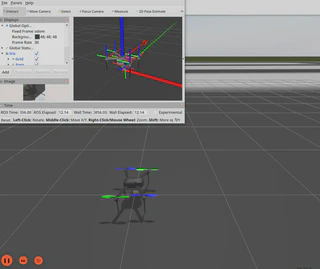
ros2 launch ardupilot_gz_bringup iris_runway.launch.py
This launch file starts ArduPilot SITL, Gazebo, and RViz.
11. Control with MAVProxy
After the simulation starts, connect from a new terminal:
mavproxy.py --master=127.0.0.1:14550
Inside MAVProxy:
mode guided
arm throttle
takeoff 10
12. Common Verification and Debugging
Check versions:
lsb_release -a
ros2 pkg list | head
gz sim --versions
colcon version-check
vcs --version
cd ~/ardu_ws/src/ardupilot && git describe --tags --always --dirty
Check environment variables:
printenv | grep -E 'ROS|GZ'
Clean and rebuild:
cd ~/ardu_ws
rm -rf build install log
source /opt/ros/jazzy/setup.bash
export GZ_VERSION=harmonic
colcon build --packages-up-to ardupilot_gz_bringup
If you see ROS_DISTRO was set to 'humble' before, the shell probably sourced an old Humble environment from ~/.bashrc or the current terminal. On Ubuntu 24.04, this guide should only source:
source /opt/ros/jazzy/setup.bash
source ~/ardu_ws/install/setup.bash
13. Common Issues
13.1 One Missing Apt Package Prevents curl from Installing
Symptom:
E: Unable to locate package python3-vcstool
E: Unable to locate package python3-colcon-common-extensions
E: Unable to locate package python3-rosdep
Command 'curl' not found
dpkg: error: cannot access archive '/tmp/ros2-apt-source.deb': No such file or directory
E: Unable to locate package ros-jazzy-desktop
Cause:
If curl, python3-vcstool, python3-colcon-common-extensions, and python3-rosdep are placed in the same apt install command before the ROS source is added, one unavailable package causes the entire command to fail. As a result, curl is not installed, the ROS 2 apt source cannot be downloaded, and ros-jazzy-desktop is unavailable.
Fix:
Install only the minimal tools first:
sudo apt update
sudo apt install curl gnupg lsb-release software-properties-common locales -y
Then add the ROS 2 source and install ROS:
export ROS_APT_SOURCE_VERSION=$(curl -s https://api.github.com/repos/ros-infrastructure/ros-apt-source/releases/latest | grep -F "tag_name" | awk -F'"' '{print $4}')
echo $ROS_APT_SOURCE_VERSION

curl -L -o /tmp/ros2-apt-source.deb "https://github.com/ros-infrastructure/ros-apt-source/releases/download/${ROS_APT_SOURCE_VERSION}/ros2-apt-source_${ROS_APT_SOURCE_VERSION}.$(. /etc/os-release && echo ${UBUNTU_CODENAME:-${VERSION_CODENAME}})_all.deb"

sudo dpkg -i /tmp/ros2-apt-source.deb
sudo apt update
sudo apt install ros-jazzy-desktop ros-dev-tools -y
13.2 ros-jazzy-desktop Cannot Be Found
Symptom:
E: Unable to locate package ros-jazzy-desktop
Check:
find /etc/apt/sources.list.d -maxdepth 1 -type f -printf '%f\n' | sort
apt-cache policy ros-jazzy-desktop ros2-apt-source
If the ROS 2 source is missing, rerun the ros2-apt-source steps in section 2.3.
13.3 ros-dev-tools Dependency Conflicts
Symptom:
Installing ros-dev-tools reports dependency conflicts, especially when Ubuntu 24.04 apt sources include only noble and not noble-updates or noble-backports.
Check:
grep Suites /etc/apt/sources.list.d/ubuntu.sources
Recommended suites:
Suites: noble noble-updates noble-backports
After fixing the apt sources, update the system:
sudo apt clean
sudo apt update
sudo apt full-upgrade -y
13.4 Old Humble Environment Is Mixed In
Symptom:
ROS_DISTRO was set to 'humble' before
Cause:
~/.bashrc or the current terminal sourced an old Humble environment. The Ubuntu 24.04 route in this guide uses Jazzy.
Fix:
Edit ~/.bashrc and comment out old Humble lines:
gedit ~/.bashrc
Keep only the Jazzy setup:
source /opt/ros/jazzy/setup.bash
source ~/ardu_ws/install/setup.bash
export ROS_DOMAIN_ID=0
export ROS_LOCALHOST_ONLY=0
export GZ_VERSION=harmonic
13.5 Remote Tools Cannot Enter the Sudo Password
Symptom:
sudo: a terminal is required to read the password
sudo: a password is required
Cause:
Some remote execution tools cannot display the interactive sudo password prompt. Even if sudo -v was run in a local terminal, the sudo cache can be tied to a different TTY and may not be shared across sessions.
Fix:
Run the sudo apt ... steps manually in a local terminal, then check:
command -v ros2
command -v gz
command -v colcon
command -v vcs
13.6 ros2 --version or colcon --version Fails
Symptom:
ros2: error: unrecognized arguments: --version
colcon: error: argument verb_name: invalid choice: '--version'
Cause:
The ROS 2 Jazzy ros2 CLI and the current colcon command do not use --version as their version check.
Use:
source /opt/ros/jazzy/setup.bash
printenv | grep -E 'ROS_VERSION|ROS_DISTRO|ROS_PYTHON_VERSION'
ros2 pkg list | head
colcon version-check
vcs --version
rosdep --version
13.7 Official Repos Still Pull Humble Branches on Ubuntu 24.04/Jazzy
Symptom:
rosdep install reports old Ignition/Gazebo dependencies that cannot be resolved, such as:
No definition of [ignition-gazebo6] for OS version [noble]
No definition of [ignition-transport11] for OS version [noble]
No definition of [sdformat12] for OS version [noble]
Cause:
At the time of this setup, ArduPilot ardupilot_gz/main/ros2_gz.repos still specified:
micro_ros_agent: humble
ros_gz: humble
sdformat_urdf: humble
For Ubuntu 24.04 + ROS 2 Jazzy, switch them to the Jazzy branches:
cd ~/ardu_ws
git -C src/micro_ros_agent checkout jazzy
git -C src/ros_gz checkout jazzy
git -C src/sdformat_urdf checkout jazzy
Then recheck:
source /opt/ros/jazzy/setup.bash
export GZ_VERSION=harmonic
rosdep check --from-paths src --ignore-src -r
13.8 Gazebo Harmonic Rosdep Keys Cannot Be Resolved on Noble
Symptom:
Cannot locate rosdep definition for [gz-sim8]
No definition of [gz-plugin2] for OS [ubuntu]
No definition of [gz-cmake3] for OS [ubuntu]
No definition of [gz-common5] for OS [ubuntu]
Cause:
The Gazebo Harmonic development packages are installed, but rosdep may not have matching Ubuntu Noble rules for these Gazebo Harmonic keys.
Check:
apt-cache policy libgz-sim8-dev libgz-plugin2-dev libgz-cmake3-dev libgz-common5-dev
If the packages are installed, skip these keys during rosdep:
rosdep install --from-paths src --ignore-src -r -y --skip-keys="gz-sim8 gz-plugin2 gz-cmake3 gz-common5"
13.9 microxrceddsgen Is Missing While Building ardupilot_sitl
Symptom:
Could not find the program ['microxrceddsgen']
Cause:
The ArduPilot DDS build requires the Micro XRCE-DDS IDL code generator.
Install:
cd
git clone --recurse-submodules https://github.com/ArduPilot/Micro-XRCE-DDS-Gen.git
cd ~/Micro-XRCE-DDS-Gen
./gradlew assemble
echo 'export PATH=$PATH:$HOME/Micro-XRCE-DDS-Gen/scripts' >> ~/.bashrc
source ~/.bashrc
microxrceddsgen -version
If ./gradlew assemble reports a Java version error:
Unsupported class file major version 65
The current Java version is likely too new, for example OpenJDK 21. Use OpenJDK 17:
sudo apt install openjdk-17-jdk -y
cd ~/Micro-XRCE-DDS-Gen
export JAVA_HOME=/usr/lib/jvm/java-17-openjdk-amd64
export PATH=$JAVA_HOME/bin:$PATH
java -version
./gradlew assemble
Use the ArduPilot fork first:
https://github.com/ArduPilot/Micro-XRCE-DDS-Gen.git
In this setup, the eProsima upstream version microxrceddsgen 2.0.2 was found, but several AP_DDS IDL generation tasks failed with exit status 255. Switching to the ArduPilot fork v4.7.2 allowed ardupilot_sitl to build.
13.10 robot_state_publisher or Gazebo Cannot Find package://ardupilot_gazebo/...
Symptom:
Unable to find uri[package://ardupilot_gazebo/models/iris_with_standoffs]
Unable to find uri[package://ardupilot_gazebo/models/gimbal_small_3d]
Failed to parse robot description using: sdformat_urdf_plugin/SDFormatURDFParser
Cause:
The model files exist, but Gazebo and sdformat_urdf need the package share root to resolve package://ardupilot_gazebo/.... Adding only share/ardupilot_gazebo/models and share/ardupilot_gazebo/worlds may not be enough.
Fix:
Do not modify model source files first. Add this to the ArduPilot environment block in ~/.bashrc:
export GZ_SIM_RESOURCE_PATH=$GZ_SIM_RESOURCE_PATH:$HOME/ardu_ws/install/ardupilot_gazebo/share
export SDF_PATH=$GZ_SIM_RESOURCE_PATH
Verify:
cd ~/ardu_ws
source /opt/ros/jazzy/setup.bash
source ~/ardu_ws/install/setup.bash
export GZ_VERSION=harmonic
ros2 launch ardupilot_gz_bringup iris_runway.launch.py
13.11 Gazebo GUI Cannot Find Meshes, or mavproxy.py: not found
Symptom:
/bin/sh: 1: mavproxy.py: not found
Unable to find file with URI [package://ardupilot_gazebo/models/iris_with_standoffs/meshes/iris.dae]
Unable to find file with URI [package://ardupilot_gazebo/models/gimbal_small_3d/meshes/yaw_arm.dae]
Cause:
The ArduPilot dependency script installs MAVProxy under ~/venv-ardupilot/bin, but a normal new terminal may not source ~/.profile, so mavproxy.py is not in PATH.
Gazebo’s environment hook adds:
~/ardu_ws/install/ardupilot_gazebo/share/ardupilot_gazebo/models
~/ardu_ws/install/ardupilot_gazebo/share/ardupilot_gazebo/worlds
However, the GUI also needs the package share root to resolve package://ardupilot_gazebo/...:
~/ardu_ws/install/ardupilot_gazebo/share
Fix:
Add this to the ArduPilot environment block in ~/.bashrc:
export GZ_SIM_RESOURCE_PATH=$GZ_SIM_RESOURCE_PATH:$HOME/ardu_ws/install/ardupilot_gazebo/share
export SDF_PATH=$GZ_SIM_RESOURCE_PATH
export PATH=$JAVA_HOME/bin:$HOME/venv-ardupilot/bin:$PATH:$HOME/Micro-XRCE-DDS-Gen/scripts
Then open a new terminal or run:
source ~/.bashrc
14. Actual Setup Log
- 2026-06-21: Confirmed the machine was running Ubuntu 24.04.4 LTS Noble.
- 2026-06-21: Confirmed
/opt/rosdid not exist, andros2,gz,colcon, andvcswere not installed. - 2026-06-21: Chose a fresh ROS 2 Jazzy + Gazebo Harmonic +
~/ardu_wssetup. - 2026-06-21: Remote
sudo apt ...commands could not display an interactive password prompt, so sudo installation steps had to be run manually in a local terminal. - 2026-06-21: The first ROS install attempt failed because
curlwas installed together with packages that were unavailable before adding the ROS source. The fix was to installcurl, add the ROS 2 source, then install ROS packages. - 2026-06-21: After adding the ROS 2 source,
ros-jazzy-desktopandros-dev-toolsinstalled successfully. - 2026-06-21: Confirmed
ROS_DISTRO=jazzy,ros-jazzy-desktop=0.11.0-1noble.20260616.084553,ros-dev-tools=1.0.1,ros2-apt-source=1.2.0~noble,vcs=0.3.0, androsdep=0.26.0. - 2026-06-21: Confirmed
ros2 --versionandcolcon --versionwere not useful checks; replaced them withros2 pkg list,colcon version-check,vcs --version, androsdep --version. - 2026-06-21: Gazebo Harmonic installed successfully;
gz sim --versionsreported8.14.0, andgz-harmonic=1.0.0-1~noble. - 2026-06-21: Created
~/ardu_ws/srcand imported ArduPilotTools/ros2/ros2.reposplusardupilot_gz/main/ros2_gz.repos. - 2026-06-21:
colcon listconfirmed packages includingardupilot_msgs,ardupilot_sitl,ardupilot_dds_tests,micro_ros_agent,ardupilot_gazebo,ardupilot_gz_*,ros_gz*, andsdformat_urdf. - 2026-06-21: The official repos still specified
micro_ros_agent: humble,ros_gz: humble, andsdformat_urdf: humble; when dependency issues appeared, those repositories were switched tojazzy. - 2026-06-21: ArduPilot
install-prereqs-ubuntu.sh -ycompleted successfully and installed the STM32 toolchaingcc-arm-none-eabi-10-2020-q4-major. - 2026-06-21: Confirmed
rosdepwas initialized,sim_vehicle.pywas available, andarm-none-eabi-gccwas GNU Arm Embedded Toolchain10.2.1 20201103. - 2026-06-21: After switching the relevant repositories to Jazzy branches, old Ignition dependencies disappeared. Remaining
gz-sim8,gz-plugin2,gz-cmake3, andgz-common5rosdep keys were skipped after verifying the corresponding dev packages were installed. - 2026-06-21:
rosdep check --from-paths src --ignore-src -r --skip-keys="gz-sim8 gz-plugin2 gz-cmake3 gz-common5"passed withAll system dependencies have been satisfied. - 2026-06-21: The first
ardupilot_sitlbuild failed becausemicroxrceddsgenwas missing. The eProsima upstream generator built only after switching to OpenJDK 17, but AP_DDS IDL generation still failed. - 2026-06-21: Switched to the ArduPilot fork of
Micro-XRCE-DDS-Gen, versionv4.7.2. - 2026-06-21: With the ArduPilot fork, OpenJDK 17, and the generator scripts on
PATH,colcon build --packages-up-to ardupilot_sitlsucceeded in about 2 minutes 48 seconds. - 2026-06-21:
colcon build --packages-up-to ardupilot_gz_bringupsucceeded; 13 packages completed in about 2 minutes 24 seconds. - 2026-06-21: The first headless launch failed because
robot_state_publishercould not resolvepackage://ardupilot_gazebo/models/.... The fix was to add the package share root toGZ_SIM_RESOURCE_PATH. - 2026-06-21: During GUI launch,
mavproxy.pywas missing fromPATH, and Gazebo GUI could not resolvepackage://ardupilot_gazebo/...meshes. Adding~/venv-ardupilot/bintoPATHand~/ardu_ws/install/ardupilot_gazebo/sharetoGZ_SIM_RESOURCE_PATHfixed the issue.