Ubuntu 24.04 + ROS 2 Jazzy + Gazebo Harmonic + PX4 SITL
This documentation records a PX4 simulation setup performed on Ubuntu 24.04.4 LTS Noble. The stack used here is ROS 2 Jazzy, Gazebo Harmonic, PX4 SITL, and Micro XRCE-DDS Agent.
PX4’s Gazebo SITL route supports Ubuntu 24.04 and Gazebo Harmonic. The PX4 ROS 2 user guide still primarily recommends Ubuntu 22.04 and ROS 2 Humble, so this page records the practical Jazzy/Harmonic route used on this machine and keeps compatibility notes explicit.
Using an agent to install this stack? Download the PX4 agent-oriented Markdown guide and give it directly to Codex, Claude Code, Cursor Agent, or a similar coding agent.
0. Initial System State
uname -a
lsb_release -a
ls -la /opt/ros
command -v ros2
command -v gz
command -v colcon
command -v vcs
command -v MicroXRCEAgent
The initial checks on 2026-06-24 were:
Ubuntu 24.04.4 LTS, codename noble
ROS 2: /opt/ros/jazzy/bin/ros2
ROS_DISTRO=jazzy
Gazebo: gz-harmonic installed
gz-harmonic=1.0.0-1~noble
libgz-sim8-dev=8.14.0-1~noble
gz sim --versions reported 8.11.0
MicroXRCEAgent: command not found
PX4-Autopilot: not yet found at ~/PX4-Autopilot
This machine already had an ArduPilot ROS 2/Gazebo environment. For PX4, use a clean terminal and avoid inheriting ArduPilot paths such as ~/ardu_ws/install/..., GZ_SIM_RESOURCE_PATH, SDF_PATH, and ~/venv-ardupilot/bin.
0.1 Current Completed State
By the end of the setup on 2026-06-24, the local state was:
PX4-Autopilot: ~/PX4-Autopilot
PX4 branch: main
PX4 commit: 3042f906ab
PX4 submodules: 35
PX4 Python venv: ~/venv-px4
Micro XRCE-DDS Agent: ~/Micro-XRCE-DDS-Agent, tag v2.4.3, commit 7362281
ROS 2 workspace: ~/px4_ros2_ws
px4_msgs branch: main
px4_ros_com branch: main
Verified locally:
make px4_sitlbuilt successfully and generated~/PX4-Autopilot/build/px4_sitl_default/bin/px4.PX4_GZ_NO_FOLLOW=1 make px4_sitl gz_x500started PX4 with Gazebo simulator8.11.0, PX4’sdefault.sdfworld, and thex500_0model.- PX4 SITL started
uxrce_dds_clientagainst127.0.0.1:8888. - The locally built
MicroXRCEAgent udp4 -p 8888accepted the PX4 DDS connection. px4_msgsandpx4_ros_combuilt successfully in ROS 2 Jazzy.- ROS 2 Jazzy could list
/fmu/in/...and/fmu/out/...topics. ros2 topic echo /fmu/out/sensor_combined --oncereceived IMU data.
Example sensor_combined output:
timestamp: 1782236469088097
gyro_rad:
- -0.0009602049249224365
- -0.00032172040664590895
- -0.0013022938510403037
accelerometer_m_s2:
- 0.0025522205978631973
- -0.004136626608669758
- -9.807899475097656
1. Version Choices
| Component | Local choice | Notes |
|---|---|---|
| Ubuntu | 24.04.4 LTS Noble | PX4 supports Ubuntu 24.04 and 22.04 |
| ROS 2 | Jazzy Jalisco | Native ROS 2 release for Ubuntu 24.04 |
| Gazebo | Harmonic | Supported by PX4’s Ubuntu and Gazebo SITL routes |
| Gazebo Sim ABI | libgz-sim8 | Gazebo Harmonic uses Gazebo Sim 8 |
| PX4 workspace | ~/PX4-Autopilot | PX4 upstream source tree |
| ROS 2 workspace | ~/px4_ros2_ws | Holds px4_msgs, px4_ros_com, and custom ROS 2 nodes |
| DDS transport | PX4 uXRCE-DDS + Micro XRCE-DDS Agent | PX4 v1.14+ ROS 2 communication path |
| Ground station | QGroundControl | Usually auto-connects to PX4 SITL over UDP |
Official references:
- PX4 Ubuntu Development Environment
- PX4 Gazebo Simulation
- PX4 ROS 2 User Guide
- ROS 2 Jazzy Ubuntu deb packages
- Gazebo Harmonic on Ubuntu
2. Install ROS 2 Jazzy
Skip this section if ROS 2 Jazzy is already installed and verified.
2.1 Locale
locale
sudo apt update
sudo apt install locales -y
sudo locale-gen en_US en_US.UTF-8
sudo update-locale LC_ALL=en_US.UTF-8 LANG=en_US.UTF-8
export LANG=en_US.UTF-8
locale
2.2 Enable Ubuntu Universe
sudo apt install software-properties-common -y
sudo add-apt-repository universe
2.3 Add the ROS 2 Apt Source
In 2026, ROS recommends using the ros2-apt-source package to manage the apt source and key.
sudo apt update
sudo apt install curl gnupg lsb-release software-properties-common locales -y
sudo apt update
sudo apt install curl -y
export ROS_APT_SOURCE_VERSION=$(curl -s https://api.github.com/repos/ros-infrastructure/ros-apt-source/releases/latest | grep -F "tag_name" | awk -F'"' '{print $4}')
curl -L -o /tmp/ros2-apt-source.deb "https://github.com/ros-infrastructure/ros-apt-source/releases/download/${ROS_APT_SOURCE_VERSION}/ros2-apt-source_${ROS_APT_SOURCE_VERSION}.$(. /etc/os-release && echo ${UBUNTU_CODENAME:-${VERSION_CODENAME}})_all.deb"
sudo dpkg -i /tmp/ros2-apt-source.deb
2.4 Install ROS 2 Jazzy Desktop and Development Tools
sudo apt update
sudo apt full-upgrade -y
sudo apt install ros-jazzy-desktop ros-dev-tools -y
If ros-dev-tools reports dependency conflicts, check that Noble updates and backports are enabled:
grep Suites /etc/apt/sources.list.d/ubuntu.sources
The normal suites should include:
Suites: noble noble-updates noble-backports
2.5 ROS 2 Environment Variables
Test manually first:
source /opt/ros/jazzy/setup.bash
printenv | grep -i ROS
ros2 pkg list | head
Then add this to ~/.bashrc:
cat <<'EOF' >> ~/.bashrc

# ROS 2 Jazzy, Ubuntu 24.04
source /opt/ros/jazzy/setup.bash
export ROS_DOMAIN_ID=0
export ROS_LOCALHOST_ONLY=0
EOF
source ~/.bashrc
2.6 Test ROS 2
Terminal 1:
source /opt/ros/jazzy/setup.bash
ros2 run demo_nodes_cpp talker
Terminal 2:
source /opt/ros/jazzy/setup.bash
ros2 run demo_nodes_py listener
If the listener receives messages from the talker, the ROS 2 base installation works.
3. Install Gazebo Harmonic
If gz-harmonic is already installed, just run the verification commands.
sudo apt-get update
sudo apt-get install curl lsb-release gnupg -y
sudo curl https://packages.osrfoundation.org/gazebo.gpg --output /usr/share/keyrings/pkgs-osrf-archive-keyring.gpg
echo "deb [arch=$(dpkg --print-architecture) signed-by=/usr/share/keyrings/pkgs-osrf-archive-keyring.gpg] https://packages.osrfoundation.org/gazebo/ubuntu-stable $(lsb_release -cs) main" | sudo tee /etc/apt/sources.list.d/gazebo-stable.list > /dev/null
sudo apt-get update
sudo apt-get install gz-harmonic -y
Add this to ~/.bashrc:
cat <<'EOF' >> ~/.bashrc

# Gazebo Harmonic for PX4 simulation
export GZ_VERSION=harmonic
EOF
source ~/.bashrc
Verify:
gz sim --versions
apt-cache policy gz-harmonic libgz-sim8 libgz-sim8-dev
Local record from 2026-06-24:
gz-harmonic=1.0.0-1~noble
libgz-sim8=8.14.0-1~noble
libgz-sim8-dev=8.14.0-1~noble
gz sim --versions reported 8.11.0
For this route, do not install gazebo11 or libgazebo-dev. Those belong to Gazebo Classic and can create confusing mixed environments.
4. Install PX4 Base Dependencies
PX4 recommends using the repository script Tools/setup/ubuntu.sh. Because Gazebo Harmonic was already installed on this machine, the local route used --no-sim-tools to avoid reinstalling simulator tooling.
Install common tools:
sudo apt update
sudo apt install git wget curl python3-pip python3-venv python3-colcon-common-extensions python3-vcstool -y
Clone PX4:
cd ~
git clone https://github.com/PX4/PX4-Autopilot.git --recursive
Install PX4 development dependencies:
bash ~/PX4-Autopilot/Tools/setup/ubuntu.sh --no-sim-tools
Notes:
- On a clean Ubuntu installation, running
bash ./PX4-Autopilot/Tools/setup/ubuntu.shdirectly is also reasonable; the script will install the recommended simulator dependencies. - On this machine, Harmonic was already installed, so
--no-sim-toolskept the existing Gazebo setup. - After the script finishes, reboot or open a fresh terminal.
- Do not reuse
~/venv-ardupilot; otherwise CMake may find the ArduPilot Python environment and miss PX4 Python dependencies such askconfiglibormenuconfig.
Local setup used a dedicated PX4 Python venv:
/usr/bin/python3 -m venv ~/venv-px4
~/venv-px4/bin/python -m pip install --upgrade pip
~/venv-px4/bin/python -m pip install -r ~/PX4-Autopilot/Tools/setup/requirements.txt
Update submodules:
cd ~/PX4-Autopilot
git submodule update --init --recursive
5. Test PX4 SITL with Gazebo Harmonic
Use a clean terminal. Do not source ~/ardu_ws/install/setup.bash, and avoid inheriting ArduPilot’s Gazebo resource paths.
Check the current shell:
command -v gz
gz sim --versions
printenv | grep -E '^(ROS_DISTRO|ROS_DOMAIN_ID|GZ_VERSION|GZ_SIM_RESOURCE_PATH|SDF_PATH)='
If ArduPilot paths are present, clean them for this PX4 session:
unset VIRTUAL_ENV
unset PYTHONPATH
unset GZ_SIM_RESOURCE_PATH
unset SDF_PATH
export GZ_VERSION=harmonic
export PATH=~/venv-px4/bin:/usr/local/sbin:/usr/local/bin:/usr/sbin:/usr/bin:/sbin:/bin
Preferred GUI launch:
cd ~/PX4-Autopilot
PX4_GZ_NO_FOLLOW=1 make px4_sitl gz_x500 PYTHON_EXECUTABLE=~/venv-px4/bin/python
PX4’s Gazebo launch script normally switches the GUI camera into follow mode after the model spawns. Setting PX4_GZ_NO_FOLLOW=1 keeps the Gazebo GUI camera free to rotate, pan, and zoom.
The follow-camera log lines look like:
INFO  [init] Setting camera to follow x500_0
INFO  [init] Camera follow offset set to -2.0, -2.0, 2.0
With PX4_GZ_NO_FOLLOW=1, these lines should not appear.
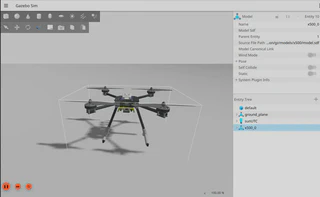
Useful Gazebo GUI controls:
Right drag: rotate view
Middle drag: pan view
Mouse wheel: zoom
Left click: select entity
Headless mode:
cd ~/PX4-Autopilot
HEADLESS=1 make px4_sitl gz_x500 PYTHON_EXECUTABLE=~/venv-px4/bin/python
Local headless output included:
PX4 starting.
INFO  [init] Gazebo simulator 8.11.0
INFO  [init] Starting gazebo with world: /home/gao/PX4-Autopilot/Tools/simulation/gz/worlds/default.sdf
INFO  [init] Gazebo world is ready
INFO  [gz_bridge] world: default, model: x500_0
INFO  [uxrce_dds_client] init UDP agent IP:127.0.0.1, port:8888
INFO  [mavlink] mode: Normal, data rate: 4000000 B/s on udp port 18570 remote port 14550
INFO  [mavlink] mode: Onboard, data rate: 4000000 B/s on udp port 14580 remote port 14540
The gz_frame_id SDF warnings seen during this test did not prevent the simulation from starting.
Set a world:
cd ~/PX4-Autopilot
PX4_GZ_WORLD=windy make px4_sitl gz_x500
Set the simulation speed factor:
cd ~/PX4-Autopilot
PX4_SIM_SPEED_FACTOR=2 make px4_sitl gz_x500
Common PX4 Gazebo targets:
| Vehicle | Command |
|---|---|
| X500 quadrotor | make px4_sitl gz_x500 |
| X500 with front depth camera | make px4_sitl gz_x500_depth |
| X500 with vision odometry | make px4_sitl gz_x500_vision |
| X500 with 2D LiDAR | make px4_sitl gz_x500_lidar_2d |
| VTOL | make px4_sitl gz_standard_vtol |
| Fixed wing | make px4_sitl gz_rc_cessna |
6. Start Gazebo and PX4 Separately
PX4 also supports standalone mode, where Gazebo and PX4 SITL are started in separate terminals.
Terminal 1, start Gazebo:
cd ~
wget https://raw.githubusercontent.com/PX4/PX4-gazebo-models/main/simulation-gazebo
python3 simulation-gazebo
Terminal 2, start PX4 and wait for Gazebo:
cd ~/PX4-Autopilot
PX4_GZ_STANDALONE=1 make px4_sitl gz_x500
If PX4 starts before Gazebo, the bridge may print:
WARN [gz bridge] Service call timed out as Gazebo has not been detected
Once Gazebo starts, PX4 should continue and connect.
7. Configure PX4 + ROS 2 Communication
PX4 v1.14 and later use uXRCE-DDS for ROS 2 communication. PX4 SITL automatically starts uxrce_dds_client, which connects to UDP port 8888 on localhost by default. The host must run MicroXRCEAgent.
7.1 Install Micro XRCE-DDS Agent
PX4’s example uses eProsima Micro XRCE-DDS Agent v2.4.3:
cd ~
git clone -b v2.4.3 https://github.com/eProsima/Micro-XRCE-DDS-Agent.git
cd Micro-XRCE-DDS-Agent
mkdir build
cd build
cmake ..
make
sudo make install
sudo ldconfig /usr/local/lib/
Verify:
command -v MicroXRCEAgent
MicroXRCEAgent --help
Start the agent:
MicroXRCEAgent udp4 -p 8888
Only one process can bind to port 8888; stop any old agent before starting a new one.
On this machine, the agent was built locally without sudo make install:
cd ~
git clone -b v2.4.3 https://github.com/eProsima/Micro-XRCE-DDS-Agent.git
cd ~/Micro-XRCE-DDS-Agent
mkdir -p build
cd build
cmake ..
make -j4
Local binary:
~/Micro-XRCE-DDS-Agent/build/MicroXRCEAgent
Start the local build:
unset LD_LIBRARY_PATH
export LD_LIBRARY_PATH=~/Micro-XRCE-DDS-Agent/build:~/Micro-XRCE-DDS-Agent/build/temp_install/fastrtps-2.14/lib:~/Micro-XRCE-DDS-Agent/build/temp_install/fastcdr-2.2.0/lib:~/Micro-XRCE-DDS-Agent/build/temp_install/microxrcedds_client-2.4.3/lib:~/Micro-XRCE-DDS-Agent/build/temp_install/microcdr-2.0.1/lib
~/Micro-XRCE-DDS-Agent/build/MicroXRCEAgent udp4 -p 8888
The ArduPilot environment on this machine also has micro_ros_agent library paths. Clear LD_LIBRARY_PATH before running the local PX4 agent to avoid linking against ArduPilot workspace libraries.
7.2 Start PX4 SITL Client
Terminal 2:
cd ~/PX4-Autopilot
make px4_sitl gz_x500
PX4 should print uxrce_dds_client synchronization and data writer logs. The agent terminal should show created publishers and subscribers.
7.3 Create the ROS 2 Workspace
mkdir -p ~/px4_ros2_ws/src
cd ~/px4_ros2_ws/src
git clone https://github.com/PX4/px4_msgs.git
git clone https://github.com/PX4/px4_ros_com.git
Notes:
px4_msgsmust match the PX4 firmware message definitions.- If PX4 uses
main, thepx4_msgsmainbranch usually matches the current development version. - If PX4 uses a release branch, switch
px4_msgsto the corresponding release branch. - PX4 v1.16+ introduces message versioning; translation nodes can help across versions, but the basic test should keep versions aligned.
Build:
cd ~/px4_ros2_ws
source /opt/ros/jazzy/setup.bash
colcon build
source install/local_setup.bash
Local Jazzy build command:
cd ~/px4_ros2_ws
unset VIRTUAL_ENV
unset PYTHONPATH
unset GZ_SIM_RESOURCE_PATH
unset SDF_PATH
unset LD_LIBRARY_PATH
source /opt/ros/jazzy/setup.bash
colcon build --event-handlers console_direct+
source install/local_setup.bash
Local build result:
px4_msgs: finished, detected version 1.17.0
px4_ros_com: finished
summary: 2 packages finished
If px4_ros_com fails on Jazzy, record the full error first, then decide whether to switch branches, install missing dependencies, or build only px4_msgs plus custom nodes.
7.4 Check ROS 2 Topics
After Micro XRCE-DDS Agent and PX4 SITL are both running, open a new terminal:
source /opt/ros/jazzy/setup.bash
source ~/px4_ros2_ws/install/local_setup.bash
ros2 topic list | grep /fmu
Common topics:
/fmu/out/sensor_combined
/fmu/out/vehicle_odometry
/fmu/out/vehicle_status
/fmu/in/offboard_control_mode
/fmu/in/trajectory_setpoint
/fmu/in/vehicle_command
Listen to IMU data:
ros2 topic echo /fmu/out/sensor_combined
If data appears, the PX4 -> uXRCE-DDS Agent -> ROS 2 path works.
Local verification:
ros2 topic list | grep /fmu
ros2 topic echo /fmu/out/sensor_combined --once
ROS 2 Jazzy listed /fmu/in/... and /fmu/out/..., and sensor_combined produced data.
8. QGroundControl Connection
After PX4 SITL starts, QGroundControl usually auto-discovers the vehicle through local UDP.
Check in QGroundControl:
- The top-left vehicle indicator shows a connected PX4 vehicle.
- Vehicle Setup can show airframe, parameters, and sensors.
- The Fly page shows the simulated vehicle state.
If QGroundControl does not auto-connect, open Application Settings -> Comm Links and add a UDP link manually. PX4 SITL commonly uses MAVLink UDP ports such as 14540 and 14550; use the exact ports printed by the PX4 terminal.
9. Recommended Clean PX4 Shell Blocks
Because this machine has both ArduPilot and PX4 environments, use this block before starting PX4:
# PX4 + ROS 2 Jazzy + Gazebo Harmonic clean shell
unset VIRTUAL_ENV
unset PYTHONPATH
unset GZ_SIM_RESOURCE_PATH
unset SDF_PATH
unset LD_LIBRARY_PATH
export ROS_DOMAIN_ID=0
export ROS_LOCALHOST_ONLY=0
export GZ_VERSION=harmonic
export PX4_GZ_NO_FOLLOW=1
export PATH=~/venv-px4/bin:/usr/local/sbin:/usr/local/bin:/usr/sbin:/usr/bin:/sbin:/bin
Start PX4 SITL with GUI camera follow disabled:
cd ~/PX4-Autopilot
make px4_sitl gz_x500 PYTHON_EXECUTABLE=~/venv-px4/bin/python
For ROS 2 communication or automated checks without GUI:
cd ~/PX4-Autopilot
HEADLESS=1 make px4_sitl gz_x500 PYTHON_EXECUTABLE=~/venv-px4/bin/python
Use a separate ROS 2 terminal for topic inspection:
unset VIRTUAL_ENV
unset PYTHONPATH
unset GZ_SIM_RESOURCE_PATH
unset SDF_PATH
unset LD_LIBRARY_PATH
source /opt/ros/jazzy/setup.bash
source ~/px4_ros2_ws/install/local_setup.bash
ros2 topic list | grep /fmu
Do not source this in the PX4 terminal unless doing an explicit comparison experiment:
source ~/ardu_ws/install/setup.bash
10. Common Issues
10.1 MicroXRCEAgent: command not found
The host-side Micro XRCE-DDS Agent is not installed. Build it from source as shown in section 7.1.
10.2 ninja: error: unknown target 'gz_x500'
Clean the PX4 build and try again:
cd ~/PX4-Autopilot
make distclean
make px4_sitl gz_x500
10.3 Gazebo Opens with the Wrong World or Model
First check whether the shell inherited ArduPilot resource paths:
printenv | grep -E '^(GZ_SIM_RESOURCE_PATH|SDF_PATH)='
Temporarily clear them:
unset GZ_SIM_RESOURCE_PATH
unset SDF_PATH
Restart PX4:
cd ~/PX4-Autopilot
make px4_sitl gz_x500
10.4 ROS 2 Cannot See /fmu/... Topics
Check each process:
pgrep -af MicroXRCEAgent
pgrep -af px4
ros2 topic list | grep /fmu
Confirm:
MicroXRCEAgent udp4 -p 8888is running.- PX4 SITL is running.
- The PX4 terminal does not show
uxrce_dds_clienterrors. - The ROS 2 terminal sourced
/opt/ros/jazzy/setup.bashand~/px4_ros2_ws/install/local_setup.bash.
10.5 ROS 2 Jazzy Differs from PX4’s Humble-Oriented Examples
The local route is:
Ubuntu 24.04.4 + ROS 2 Jazzy + Gazebo Harmonic + PX4 main
This is a reasonable 2026 Ubuntu 24.04 setup, but some PX4 ROS 2 examples and third-party offboard examples may still assume Humble. When px4_ros_com examples or custom nodes fail under Jazzy, record the concrete build/runtime error and resolve it case by case.
10.6 Gazebo GUI Camera Suddenly Locks onto the Vehicle
Symptom:
The Gazebo GUI is movable at first.
After x500_0 spawns, the view switches to a vehicle-follow camera.
Manual rotate/pan becomes awkward, as if the camera were locked.
Cause:
PX4’s Gazebo startup script sends a follow-camera command by default.
Relevant script:
~/PX4-Autopilot/ROMFS/px4fmu_common/init.d-posix/px4-rc.gzsim
Fix:
cd ~/PX4-Autopilot
PX4_GZ_NO_FOLLOW=1 make px4_sitl gz_x500 PYTHON_EXECUTABLE=~/venv-px4/bin/python
11. Remaining Local Checks
- Clone
~/PX4-Autopilot. - Create
~/venv-px4and install PX4 Python requirements. - Build
make px4_sitl. - Start
PX4_GZ_NO_FOLLOW=1 make px4_sitl gz_x500and verify the Gazebo GUI camera is not automatically locked. - Build and start
MicroXRCEAgent udp4 -p 8888. - Create
~/px4_ros2_wsand buildpx4_msgspluspx4_ros_com. - Confirm ROS 2 Jazzy can list
/fmutopics. - Confirm
/fmu/out/sensor_combinedcan be echoed. - Test QGroundControl auto-connection to PX4 SITL.
- Test
px4_ros_comoffboard examples. - Record compatibility notes for future custom ROS 2 nodes under Jazzy.
12. Actual Setup Log
- 2026-06-24: Created this PX4 + ROS 2 Jazzy + Gazebo Harmonic setup record.
- 2026-06-24: Confirmed Ubuntu 24.04.4 LTS Noble, ROS 2 Jazzy, Gazebo Harmonic, and
libgz-sim8-dev=8.14.0-1~noble. - 2026-06-24: Confirmed
MicroXRCEAgentwas not installed at the start. - 2026-06-24: Recorded that this machine also has an ArduPilot environment, so PX4 sessions should clear
GZ_SIM_RESOURCE_PATHandSDF_PATH. - 2026-06-24: Cloned
~/PX4-Autopilot, branchmain, commit3042f906ab. - 2026-06-24: Created
~/venv-px4, preventing PX4 builds from using~/venv-ardupilot. - 2026-06-24: Completed
make px4_sitl,PX4_GZ_NO_FOLLOW=1 make px4_sitl gz_x500, andHEADLESS=1 make px4_sitl gz_x500. Gazebo Harmonic/Sim 8.11.0 loadedx500_0. - 2026-06-24: Confirmed PX4’s default Gazebo follow camera can lock the GUI view, and recorded
PX4_GZ_NO_FOLLOW=1as the preferred GUI launch setting. - 2026-06-24: Built eProsima Micro XRCE-DDS Agent
v2.4.3from source and started~/Micro-XRCE-DDS-Agent/build/MicroXRCEAgent udp4 -p 8888. - 2026-06-24: Created and built
~/px4_ros2_ws;px4_msgsandpx4_ros_combuilt successfully under ROS 2 Jazzy. - 2026-06-24: Verified PX4 SITL -> Micro XRCE-DDS Agent -> ROS 2 Jazzy communication by echoing
/fmu/out/sensor_combined.